Cornerwitch Guides Hub
Walkthroughs for the cozy desktop idler—from first click to boss nights and calm idle sessions.
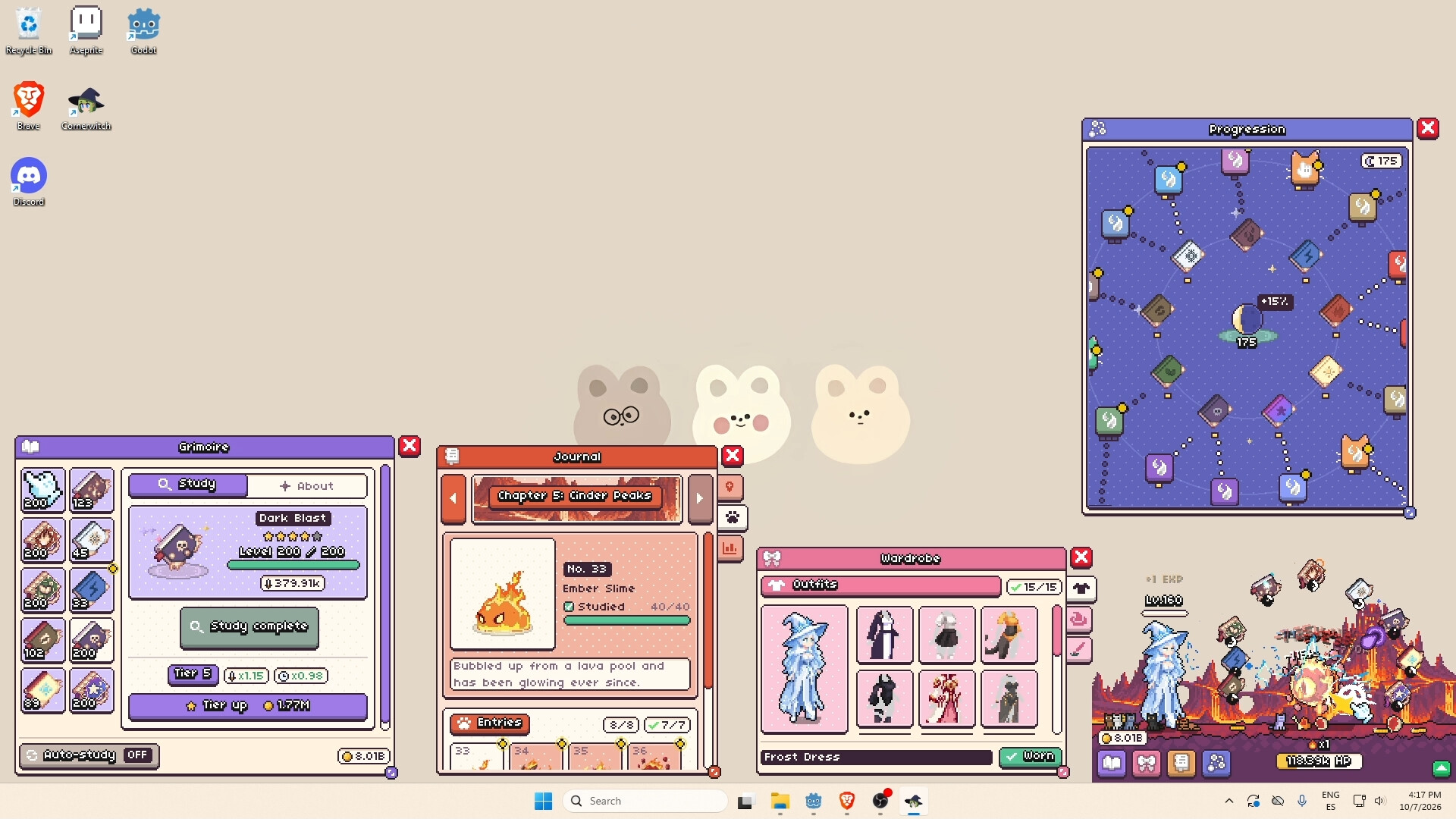
Welcome to the Cornerwitch guides hub. This cozy Steam idler from AramiGames sits on the corner of your screen: you click to defeat monsters, earn gold, level up, unlock cosmetics for the little witch, recruit spells and cats that help, fight bosses, complete studies, and hunt rare creatures. The pages below turn that loop into practical checklists without inventing spell names, cat names, damage numbers, or drop rates.
Use this hub as a map. Start with onboarding if you just bought the game (or the Steam purchase option labeled Click and Spell), then deepen systems in any order. Cross-link often—Cornerwitch rewards calm, repeated sessions more than frantic grinding.
Start here
- Getting Started — Steam install, first-hour goals, gold loop, and a distraction-light desktop setup.
- How to Play — Core click combat, leveling, unlock cadence, studies, and rare-creature hunting.
- Idle Mode — Tiny idle mode so soft progress continues while you work, plus multi-monitor habits.
New players should finish Getting Started, skim How to Play, then enable Idle Mode before a long boss push. Returning players can jump straight to bosses or cosmetics.
Progression and power
- Spells and Cats — How to evaluate helpers when the roster is still sparse: priority frameworks, synergy thinking, and what to unlock next.
- Bosses — Named Steam achievement bosses: Great Boar, Frost Golem, Fairy Queen, Necromancer, Magma Demon—prep, pacing, and achievement context.
- Achievements — Roadmap for all 22 Steam achievements: journey titles, Defeated bosses, and calm chase habits (featured).
- Studies and Creatures — Frameworks for completing studies and finding rare creatures without invented bestiary spoilers.
- Cosmetics — Witch customization unlocked through play; collection order without spoiling every skin.
For ranking ideas once you have more tools, visit the Tier List Hub, including Spell Tier Ideas, Cat Tier Ideas, and Builds. Treat tiers as living opinions—Cornerwitch is a relaxing incremental, not a PvP ladder.
Tools, patches, and links
Desktop companions need stable windows and clear hardware baselines:
- Tools Hub — Utilities and reference pages.
- System Requirements — Windows-only Steam specs (Windows 7 64-bit+, OpenGL 3.3, light storage).
- Desktop Companion Tips — Snapping, multi-monitor placement, resize freezes, Steam Deck notes.
- Updates Hub and Day One Patch — Nov 23 launch fixes (Linux/Proton, snapping toggle, max size, UI cues).
- Links — Official Steam store and support contact patterns.
How to use these guides
- Play first, wiki second. Cornerwitch teaches through clicking; guides accelerate clarity, not spoil every discovery.
- Prefer frameworks over fake numbers. When the community has not published a full spell or cat list, we teach evaluation: clear UI cues, pacing after the demo feedback update, and boss readiness.
- Keep the corner calm. Mouse-only and touch-friendly options exist; idle mode exists so the game does not demand constant attention.
- Track achievements lightly. Titles like First Spark, Apprentice, Journeywitch, Archmage, and Moon-Crowned sit beside Defeated: [boss] entries across 22 Steam achievements—nice milestones, not homework.
- Revisit after patches. Day-one and post-demo updates already changed pacing, formulas, localization, and window behavior; check the Updates Hub when something feels off.
Suggested reading paths
Brand-new witch (evening one)
Getting Started → How to Play → Idle Mode → light Cosmetics browsing.
Power and bosses (weekend)
Spells and Cats → Bosses → Builds → Day One Patch if a window or Proton quirk appears.
Desktop lifestyle
Desktop Companion Tips → Idle Mode → System Requirements.
What we will not invent
This wiki stays honest: no fabricated YouTube IDs, no made-up spell or cat names, no fake codes, no invented damage tables. When Steam, AramiGames, or in-game UI confirms a name (such as the five achievement bosses), we use it. Everything else is taught as a decision framework so you can judge tools as they unlock.
Cornerwitch is single-player, Windows-focused on Steam, with Steam Cloud, Family Sharing, achievements, mouse-only and touch-only options, and save-anytime comfort. Price at launch sat around $4.99 USD with an introductory discount window—verify the live Steam page before buying.
Browse every child page from this hub, then return when a new unlock changes your corner routine. Happy clicking—and leave room on the desk for a cat, digital or otherwise.
Frequently Asked Questions
Quick answers for new and returning witches.
Where should a brand-new Cornerwitch player start?
Begin with Getting Started for install and first-hour goals, then How to Play for the gold and unlock loop. Enable Idle Mode before long work sessions so the companion stays helpful without demanding focus.
Do these guides list every spell and cat by name?
No. We only use names confirmed in public materials. Spells and Cats teaches evaluation frameworks and progression priorities so you can judge unlocks as they appear in your build.
Is Cornerwitch multiplayer?
It is single-player only. There is no shared multiplayer mode—plan your corner sessions as a personal cozy idler with optional Steam achievements.
Where do boss names and achievements come from?
Boss names such as Great Boar, Frost Golem, Fairy Queen, Necromancer, and Magma Demon appear in Steam achievements, alongside milestones like First Spark and Archmage. See the Bosses guide for prep tips.