Cornerwitch Idle Mode Guide
Keep the cozy idler helpful in your screen corner without stealing focus from real work.
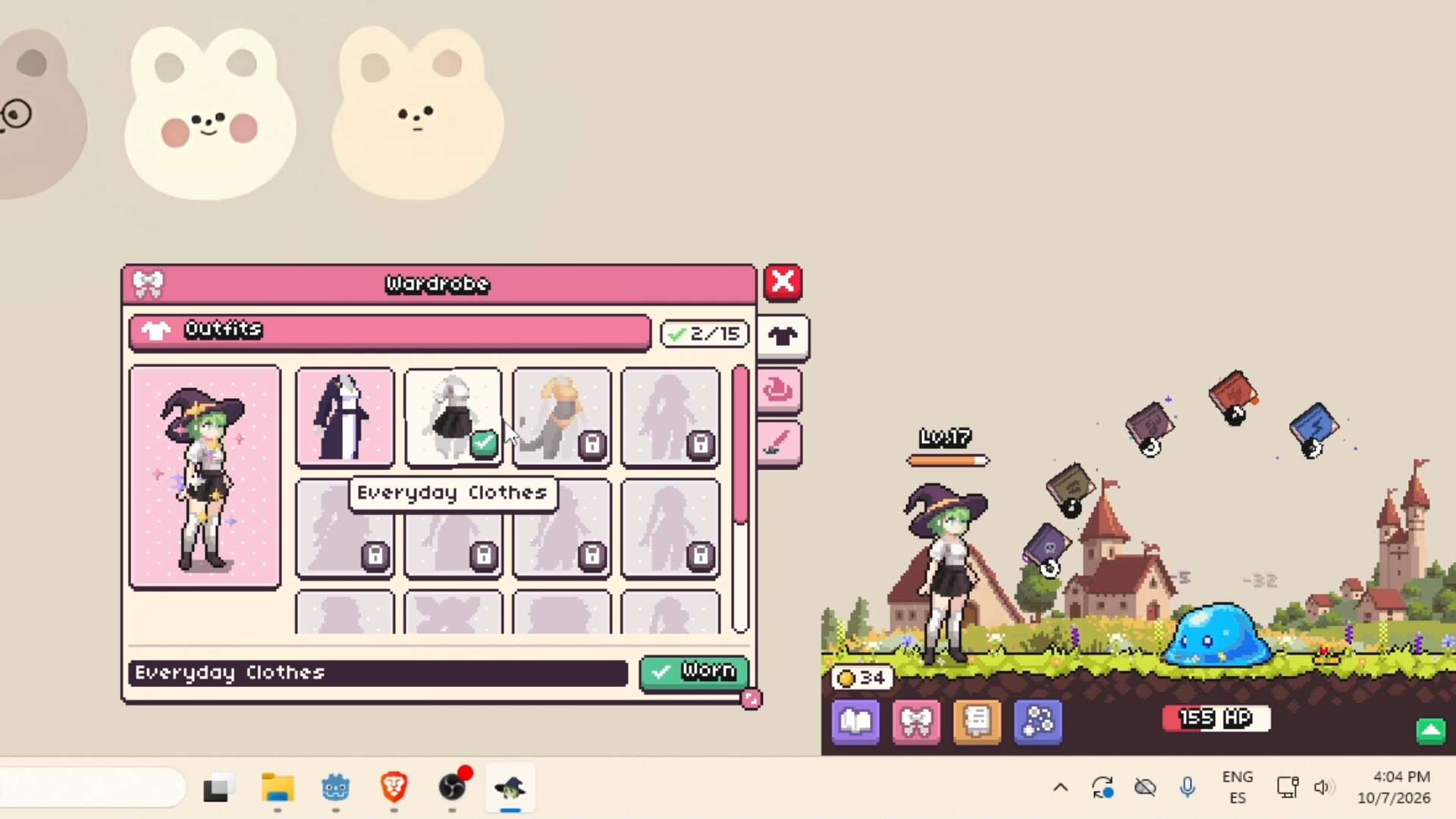
Tiny idle mode is part of Cornerwitch’s identity, not a forgotten AFK toggle. The Steam pitch describes a cozy idler that sits on the corner of your screen and includes a small idle mode meant to avoid distractions while soft progress continues. This guide explains when to idle, how to set the desktop so idle stays polite, and how idle fits beside active clicking, helpers, bosses, and cosmetics.
If you have not finished onboarding, skim Getting Started first. For the active combat loop, read How to Play. Companion window quirks live on Desktop Companion Tips.
Why idle mode exists
Cornerwitch mixes Adventure, Casual, Indie, RPG, and Simulation flavors with idler and desktop-companion tags. That mix only works if the game respects your attention budget. Idle mode lets you:
- Leave the witch working while you write, browse, or watch something else.
- Smooth the incremental curve between active click sessions.
- Reduce the guilt of “I should be clicking” that ruins cozy games.
- Keep Steam Cloud saves moving forward across short desk breaks.
Idle is not a substitute for learning the click loop. Teach yourself actively, then idle deliberately.
Active vs idle: a simple policy
| Situation | Prefer |
|---|---|
| Learning a new unlock or UI cue | Active clicking |
| Testing a spell or cat behavior | Active, short tests |
| Boss attempt (Great Boar → Magma Demon) | Active focus |
| Rare creature cue you care about | Active burst |
| Email, documents, meetings | Idle mode |
| Overnight or long AFK | Idle + stable window size |
| Cosmetic browsing for fun | Either—your call |
Boss names and achievement structure are covered in Bosses. Helper evaluation belongs in Spells and Cats.
Desktop habits that make idle pleasant
Corner placement
Park the window where your eyes already rest—bottom-right is classic, but any true corner works. Day-one patch notes mention improved multi-monitor window placement and an option to disable window snapping if the OS snap assist fights you. Details: Day One Patch.
Size discipline
The same patch increased maximum game size. Bigger can be prettier; bigger can also demand attention. For idle-first days, choose the smallest size that keeps combat readable. Community reports say resize can freeze until restart—avoid live resizing mid-idle; pick a size, restart if needed, then leave it.
Focus rules
Do not alt-tab into panic clicks every notification. Decide a cadence: for example, one active minute each half hour. Cornerwitch’s relaxing, mouse-only, touch-friendly design supports gentle check-ins.
Steam Deck and transparency
Some players reported transparency flicker on Steam Deck. Idle on Deck is experimental curiosity; Windows remains the storefront requirements baseline. See System Requirements.
Idle and progression pillars
Idle mode interacts with every major pillar:
Gold and leveling
Soft gold during idle keeps the incremental fantasy alive. Still spend levels intentionally—idle income should not auto-pilot you into unlocks you do not understand. When you return, read tooltips (improved after demo feedback and day-one UI cues) before committing.
Spells and cats
Helpers that continue working while you AFK are especially valuable for desk play. When comparing unlocks, ask: “Does this still matter in idle?” That single question often beats raw active DPS speculation. More: Spells and Cats, Spell Tier Ideas, Cat Tier Ideas.
Studies and rares
Studies can advance across longer timelines; rares may want a burst of attention. Idle covers the study grind between those spikes. Do not camp forever on a rare if it makes the companion stressful—cozy first.
Cosmetics
Idle while you decide on looks. Cosmetics unlock through play; they do not require sweaty clicking. Cosmetics explains collection mindset, including post-demo skin color options.
Bosses
Do not idle through a boss you intend to learn. Idle to prepare economy, then switch to active for Defeated: boss achievements. After a win or a clean retreat, idle again while you cool down.
Sample schedules
Deep work day
Morning: 10 minutes active warm-up and helper check. Day: idle beside docs. Lunch: 10 minutes studies/rares. Afternoon: idle. Evening: optional boss or cosmetics, then idle overnight.
Weekend achievement hunt
Active primary for bosses listed in Bosses. Idle only between attempts or during food breaks. Track First Spark → Archmage style milestones without forcing every one in a single sitting—there are 22 achievements total.
Family Sharing / couch PC
Because Family Sharing and Steam Cloud are supported, idle-friendly setups can move between household machines. Still single-player—no shared multiplayer sessions to coordinate.
Troubleshooting idle sessions
- Window jumped monitors — Re-place after the day-one multi-monitor fix; disable snapping if needed.
- Game feels visually loud — Shrink toward a true companion size; larger max size is optional, not mandatory.
- Freeze after resize — Restart once, lock dimensions, continue idle.
- Untranslated or unclear UI — Day-one localized some texts and improved cues; also check Updates Hub for later notes.
- Feeling guilty AFK — Re-read the store fantasy: distraction avoidance is a feature.
Idle mode and builds
When you brainstorm loadouts on Builds or the Tier List Hub, mark each idea as active-leaning, idle-leaning, or hybrid. Cornerwitch players who work from home often prefer hybrid: enough active punch for bosses, enough idle dignity for weekdays.
Avoid copying tier images that ignore idle entirely. A spell that shines only during frantic clicking may be worse for your real life than a quieter helper—even if a chart marks it “S tier.”
Mindset: permission to look away
Cozy idlers fail when players treat AFK as cheating. Cornerwitch’s design documents its idle stance in public store language. You have permission to:
- Mute obsession with perfect uptime.
- Click when joyful, idle when busy.
- Use Save Anytime to close without ceremony.
- Return via Cloud on another Windows PC.
Pair idle with healthy desk habits: stretch, hydrate, and keep the witch smaller than your main task window.
Related reading
- How to Play — full loop
- Desktop Companion Tips — window craft
- Day One Patch — snapping, size, monitors
- Guides Hub — everything else
- Links — Steam and support
Idle mode is the feature that lets Cornerwitch keep its promise: a magical corner companion that respects your day. Turn it on when life gets loud, and click again when you miss the spark.
Frequently Asked Questions
Quick answers for new and returning witches.
What is Cornerwitch’s tiny idle mode for?
It keeps soft progress going while reducing distractions, so the desktop companion can sit in a corner during work or breaks instead of demanding constant clicks.
Should I idle during boss fights?
For learning and achievement attempts, play bosses actively. Use idle to rebuild gold and helpers between tries, then focus for Great Boar through Magma Demon encounters.
Why does resizing sometimes freeze the game?
Community reports describe freezes until restart after resize. Set a stable companion size—especially for idle days—and restart once if the window locks up.
Can I idle on Steam Deck?
Some players experiment on Deck and have reported transparency flicker. Official requirements highlight Windows; treat Deck idle as unsupported curiosity and verify your own hardware.
Does idle replace unlocking spells and cats?
No. Idle maintains progress; helpers change how strong that progress feels. Evaluate spells and cats—especially idle-friendly ones—in the Spells and Cats guide.