Cornerwitch Studies and Rare Creatures
Frameworks for completing studies and finding rare creatures—without inventing creature names or fake drop tables.
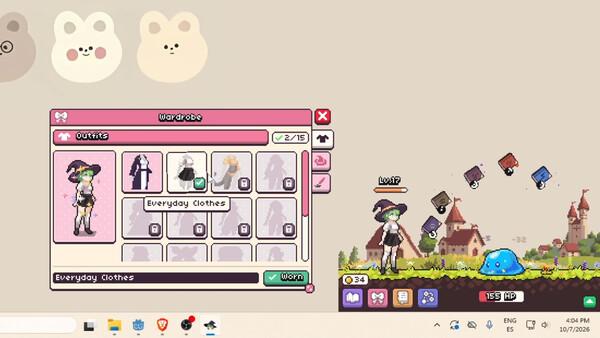
Cornerwitch’s Steam feature list calls out more than clicking for gold. Alongside leveling, cosmetics, spells and cats, bosses, and tiny idle mode, the store highlights studies and rare creatures as part of the cozy desktop loop. This guide teaches how to approach those systems when public materials do not publish a full bestiary or study syllabus. You will get session frameworks, attention habits, and wiki links—not invented creature names, study titles, percentages, or guaranteed drop rates.
Read this after Getting Started and How to Play. Cross-link Idle Mode, Spells and Cats, Bosses, Builds, Achievements, and the Guides Hub so studies never starve your gold economy.
What “studies” usually mean in this design
In cozy incrementals, studies are structured learning goals: panels that ask you to observe, unlock, or complete thematic tasks tied to magic progress. Cornerwitch’s demo feedback and day-one work both pushed clearer UI and better visual cues, which matters enormously for study systems—if a study asks you to notice a state change, muddy UI turns a calm task into guesswork.
Practical study habits:
- Read the panel slowly. After updates that localized untranslated strings and improved cues, re-open studies you abandoned during demo-era confusion (Day One Patch, Demo Feedback).
- One study thread at a time. Parallel goals are fine, but finishing a single readable objective beats juggling five half-understood cards.
- Tie studies to the click loop. If a study needs combat context, warm up on normal monsters for two minutes before focusing the study UI.
- Idle between brain-heavy tasks. Use Idle Mode to rebuild gold while you step away, then return with patience.
- Log what changed. A personal note (“study advanced after helper unlock”) beats copying unverified wiki spoilers.
What “rare creatures” usually mean here
Store copy frames rare creatures as discovery content—encounters or finds that break the routine of common clicks. Without a published bestiary, treat rarity as a habit design problem:
- Show up often enough. Rares in idlers reward consistent sessions more than one desperate all-nighter.
- Keep the UI readable. Day-one max size and visual cues help you spot unusual states in a small corner window (Desktop Companion).
- Do not panic-spend. Dumping your entire gold cushion on random unlocks “just in case” often delays boss readiness.
- Separate hunt nights from boss nights. Magma Demon prep and rare-hunting FOMO compete for attention; schedule them apart (Bosses).
This wiki will not invent creature names. When Steam, AramiGames, or your own screenshots confirm a label, add it to your personal list. Until then, frameworks keep you honest.
A weekly rhythm that respects both systems
Focus blocks (active)
- Click monsters for gold and levels.
- Advance one study objective with full attention.
- Evaluate whether a new spell or cat makes the study clearer (Spells and Cats, Tier List).
Soft blocks (idle)
- Shrink into tiny idle mode while working.
- Glance back between tasks; if something rare-looking appears, pause work intentionally—do not half-click while typing emails.
- Return to a larger window before comparing cosmetics or study text.
Milestone blocks (boss / achievement)
- Pause study perfectionism.
- Attempt the next Defeated gate you are ready for.
- Celebrate with cosmetics, then resume studies (Cosmetics, Achievements).
Economy first, collection second
Studies and rares feel bad when gold is starving. Before a dedicated hunt session:
- Confirm trash packs still feel rewarding.
- Check spend order with Builds so you are not under-leveled for comfort.
- Ensure helpers are understood—not merely owned.
- Fix window snapping / monitor placement so tooltips stay on-screen.
- Update the game so localization and Proton fixes from day one are present if you need them.
Introductory shoppers should still verify live Steam pricing (list near $4.99, launch intro messaging −40% toward $2.99 ending December 7, 2026 per verified offer windows). Purchase UI may say Click and Spell while the title remains Cornerwitch.
Linking studies to spells, cats, and cosmetics
Magic-themed studies often teach you to notice helper behavior. Use that loop:
- Unlock a helper → re-read study text → test on easy monsters → idle → decide whether the helper stays in rotation.
- Cosmetics can change contrast in a tiny window; if a study requires visual discrimination, temporarily simplify looks.
- Cat and spell tier pages offer opinion frameworks, not fake DPS sheets (Spell Tier Ideas, Cat Tier Ideas).
Rare creature hunt checklist (no spoilers)
- Play in sessions long enough for variance to matter.
- Keep audio/visual distractions low when you are actively hunting.
- Avoid continuous resize spam (community freeze-until-restart reports).
- On Steam Deck / Proton setups, note transparency flicker can hide subtle cues—see Steam Deck and prefer a clear Windows desktop when hunting seriously.
- Capture screenshots when something unusual appears; share clean reports via Steam discussions or [email protected] if it looks like a bug instead of a feature.
Achievements adjacency
Among 22 Steam achievements, journey titles (First Spark, Apprentice, Journeywitch, Archmage, Moon-Crowned) and boss Defeated entries are confirmed highlights. Studies and rare finds are natural homes for some of the remaining unpublished names. Chase them lightly: complete studies because they teach the game, hunt rares because discovery is fun—not because a third-party list invented a percentage.
Common mistakes
- Inventing a meta. If a guide online names creatures this wiki refuses to invent, treat it as unverified.
- Ignoring idle. Study burnout is real; tiny idle mode exists so the corner can breathe.
- Skipping patch notes. Faster demo pacing and clearer skill UI change how quickly study gates feel fair.
- Forcing hunts before Boar basics. Learn the combat UX on Bosses first if you are brand new.
- Multiplayer assumptions. Cornerwitch is single-player—every study completion is yours alone.
Related reading map
- Systems baseline: How to Play · Getting Started
- AFK: Idle Mode
- Power: Spells and Cats · Builds
- Combat milestones: Bosses · Achievements
- Setup: Tools · Desktop Companion · Steam Deck
- Parent hub: Guides
Closing mindset
Studies turn clicking into literacy. Rare creatures turn literacy into surprise. Cornerwitch advertises both because a desktop companion should reward curiosity during quiet evenings—not only boss checklists. Keep frameworks over spoilers, gold cushions over panic spends, and readable UI over tiny unreadable corners. When official materials eventually confirm more names, this page’s habits will still apply; only the labels will get sharper.
Frequently Asked Questions
Quick answers for new and returning witches.
Does this guide list every Cornerwitch creature by name?
No. Public store materials highlight studies and rare creatures as features, but this wiki does not invent creature names or drop tables. Use the hunt frameworks above.
Should I finish all studies before fighting bosses?
Not necessarily. Alternate study focus with boss prep. Stabilize gold and helpers first, then weave studies between Defeated attempts.
How does idle mode help with studies and rares?
Tiny idle mode rebuilds economy and soft progress while you rest attention. Return to a larger, readable window when actively advancing a study or hunting.
Where should I go after this page?
Idle Mode, Spells and Cats, Builds, Bosses, and Achievements cover the loops that most often intersect with study completion and rare finds.
Can UI patches change study clarity?
Yes. Demo feedback and day-one visual cues / localization passes make panels easier to understand—revisit abandoned studies after updating.