Getting Started with Cornerwitch
Buy, install, and settle the little witch into your screen corner without wasting the first evening.
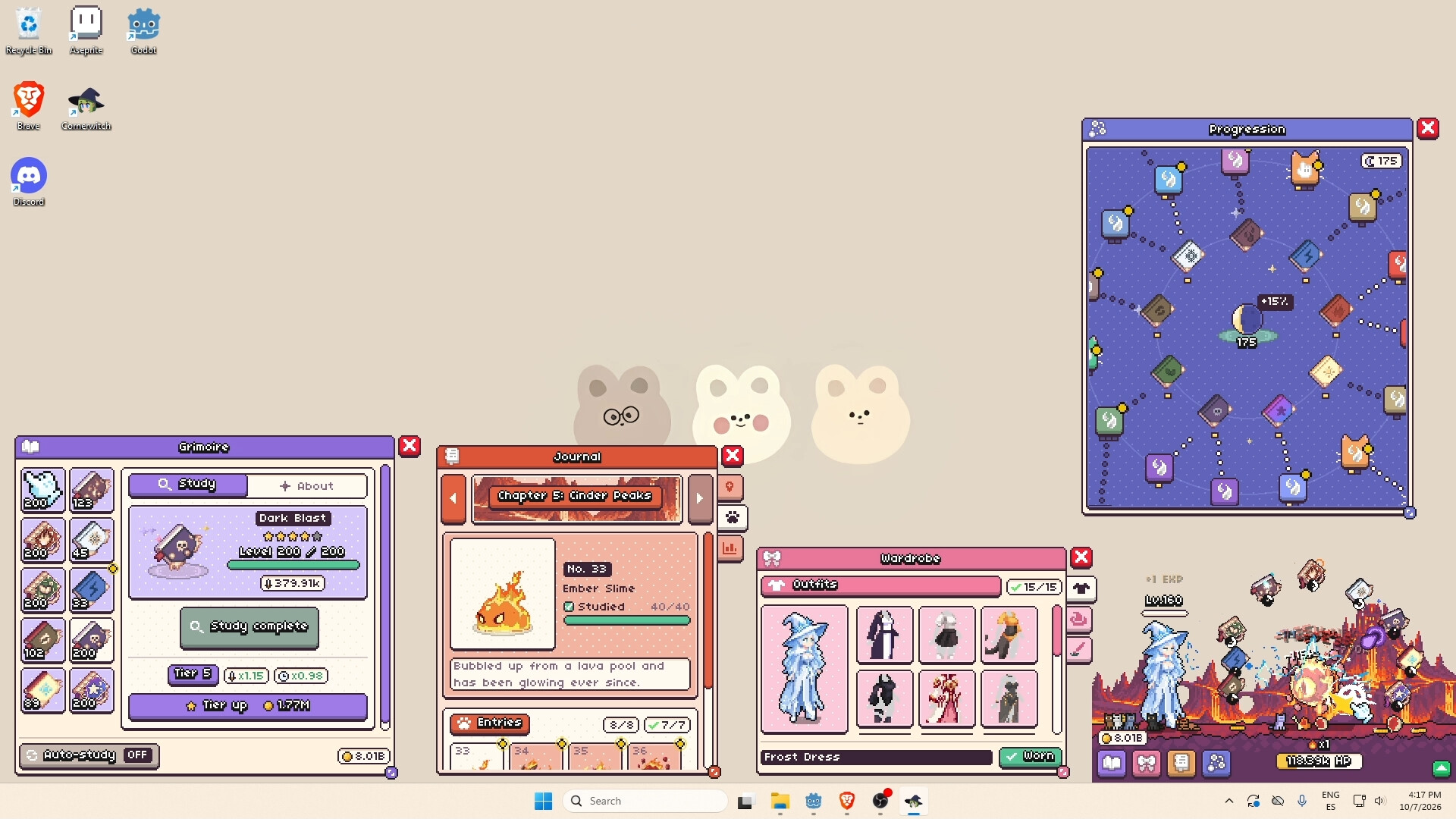
Cornerwitch is a cozy desktop idler from AramiGames (developer Rami). On Steam it appears as app 4443690; some purchase UI also shows the name Click and Spell. The game released November 23, 2026, is Windows-only at launch, and is built to live in a corner of your monitor while you click monsters, earn gold, level up, unlock cosmetics, spells, and cats, fight bosses, complete studies, and find rare creatures.
This guide covers a clean first session: store checks, install, window placement, the early click loop, and what to unlock before your first serious boss night. For deeper combat theory see How to Play. For AFK-friendly habits see Idle Mode.
Before you buy or install
Confirm the live Steam page for price. Launch listing sat near $4.99 USD with an introductory −40% window toward $2.99—discounts change, so trust the storefront over this paragraph. Genre tags lean Adventure, Casual, Indie, RPG, and Simulation, with community tags such as Idler, Desktop Companion, Cats, Pixel Graphics, Cozy, incremental, Character Customization, Female Protagonist, Magic, Mouse Only, Touch-Friendly, Relaxing, Point & Click, and Singleplayer.
Steam features to notice:
- Steam Achievements (22 total)
- Steam Cloud
- Family Sharing
- Mouse Only Option and Touch Only Option
- Save Anytime
Minimum requirements are light: Windows 7 64-bit, 2 GHz CPU, 2 GB RAM, OpenGL 3.3, about 200 MB storage. Full detail lives on System Requirements. Languages listed on Steam include English, German, Spanish (Spain), Japanese, Korean, Portuguese (Brazil), Russian, Simplified Chinese, and Spanish (LatAm)—this wiki focuses on the locales configured for the site.
Support contact pattern from the developer: [email protected]. Store and community links collect on Links.
First launch checklist
- Install from Steam and verify Cloud is enabled if you use multiple PCs.
- Place the window in a true corner—top or bottom, left or right—so it reads as a companion, not a second full game. Day-one patch notes mention better multi-monitor placement and an option to disable window snapping if snap fights your layout. See Desktop Companion Tips and Day One Patch.
- Pick input comfort. Mouse-only and touch-friendly options exist; choose what matches your desk or tablet workflow.
- Click to clear early monsters and watch gold tick up. The fantasy is incremental: short clicks, visible rewards, gentle power growth.
- Level when prompted and notice which unlocks appear—cosmetics for the witch, spells, cats, studies, and rare-creature hooks. Do not invent a forced order; follow UI clarity improved after the community demo feedback update (pacing, formulas, and easier-to-read skills).
- Try tiny idle mode once you understand active clicking, so overnight or workday sessions stay soft. Details: Idle Mode.
- Glance at achievements for motivation, not pressure—First Spark, Apprentice, Journeywitch, Archmage, Moon-Crowned, plus Defeated entries for named bosses.
Understanding the early loop
Cornerwitch’s heart is simple on purpose:
| Action | Why it matters early |
|---|---|
| Click monsters | Primary gold and combat feedback |
| Earn gold | Funds progression and unlocks |
| Level up | Opens cosmetics, spells, cats, and harder content |
| Unlock helpers | Spells and cats reduce pure click load |
| Studies & rares | Longer-term collection goals |
| Bosses | Milestone fights tied to achievements |
Your first hour should prove three things: the window stays readable at corner size, clicking feels relaxing rather than stressful, and at least one helper or cosmetic path is visible so the witch feels personal. If the UI still feels dense, remember the demo-era feedback pass improved pacing and made spells/skills easier to understand—launch builds should already reflect that direction, with day-one localization and cue polish on top.
What to unlock first (priority framework)
Without spoiling every item name, use this order of operations:
- Anything that clarifies the UI — If a toggle or tutorial cue reduces confusion, take it. Clear feedback beats raw power in hour one.
- Helpers that reduce repetitive clicking — Spells and cats exist so the companion can work with you. Evaluate them with the frameworks in Spells and Cats and later Spell Tier Ideas / Cat Tier Ideas.
- Cosmetics you enjoy — Cornerwitch sells cozy identity; a skin or color you like increases session length more than a marginal DPS myth. See Cosmetics. Community notes mention new skin colors from the demo feedback update—expect customization to matter early.
- Boss readiness second evening — Do not rush Great Boar or later bosses until gold flow and helpers feel stable. Prep lives in Bosses.
- Build experiments last — Once you have options, sketch ideas on Builds and the Tier List Hub.
Desktop setup that respects focus
Cornerwitch markets a tiny idle mode to avoid distractions. Treat that seriously:
- Keep the game below your primary work window’s attention line.
- Prefer smaller maximum sizes if the day-one patch’s increased max size makes the companion too loud visually.
- If resize freezes until restart (community report), avoid rapid drag-resizing; restart once and lock a size you like.
- Steam Deck users have reported transparency flicker—playable curiosity, not the primary target platform (Windows is the listed OS).
More companion habits: Desktop Companion Tips. Patch context: Updates Hub.
First-evening goals (practical)
Aim for outcomes, not stopwatches:
- Survive a continuous click session without wanting to quit.
- Understand how gold converts into the next unlock you care about.
- Enable idle mode and confirm soft progress while you answer email or browse.
- Bookmark this wiki’s Guides Hub for bosses and helpers later.
- Note achievement names you are close to—First Spark style milestones are meant to celebrate early magic, not gatekeep.
Common early mistakes
- Treating it like a hardcore ARPG. It is a relaxing incremental desktop companion. If you feel sweaty, shrink the window and slow down.
- Ignoring idle mode. The product pitch includes distraction-light play; use it.
- Chasing fake tier lists. Until you own tools, frameworks beat copied rankings. Our Tier List pages are idea boards, not gospel.
- Skipping patch notes. Day-one changes touched Linux/Proton compatibility, untranslated text, snapping, max size, multi-monitor placement, and UI cues—worth a skim even on Windows.
- Expecting shared multiplayer. Single-player only; plan solo cozy nights.
After the first session
Read How to Play for combat and study cadence, then Spells and Cats before a helper spending spree. When a boss achievement appears, open Bosses. Keep Cosmetics open in a second tab if personalizing the witch is your main joy.
Cornerwitch works best when the corner feels inviting. Set the window, click a few monsters, unlock something pretty or helpful, and let the idle loop breathe. That is getting started done right.
Frequently Asked Questions
Quick answers for new and returning witches.
Is Cornerwitch the same as Click and Spell on Steam?
The Steam purchase option can also show the name Click and Spell. The product is Cornerwitch by AramiGames, Steam app 4443690—confirm the store page before buying.
What should I do in the first hour?
Place the window in a corner, learn the click-to-gold loop, level once or twice, unlock an early helper or cosmetic you understand, and try tiny idle mode so the game fits beside real work.
Does Cornerwitch run on Mac or consoles?
Listed platforms emphasize Windows on Steam. Community experiments (such as Steam Deck) exist, but treat Windows desktop as the supported target and check live Steam details.
Where do I get help from the developer?
AramiGames support is listed around [email protected]. Also use Steam discussions and the Links page on this wiki for official destinations.
Should I fight bosses on day one?
Only after gold income and basic helpers feel comfortable. Use the Bosses guide for Great Boar through Magma Demon prep instead of forcing early Defeated achievements.