How to Play Cornerwitch
The full cozy loop—clicks, gold, levels, helpers, studies, rares, and boss nights—explained without fake numbers.
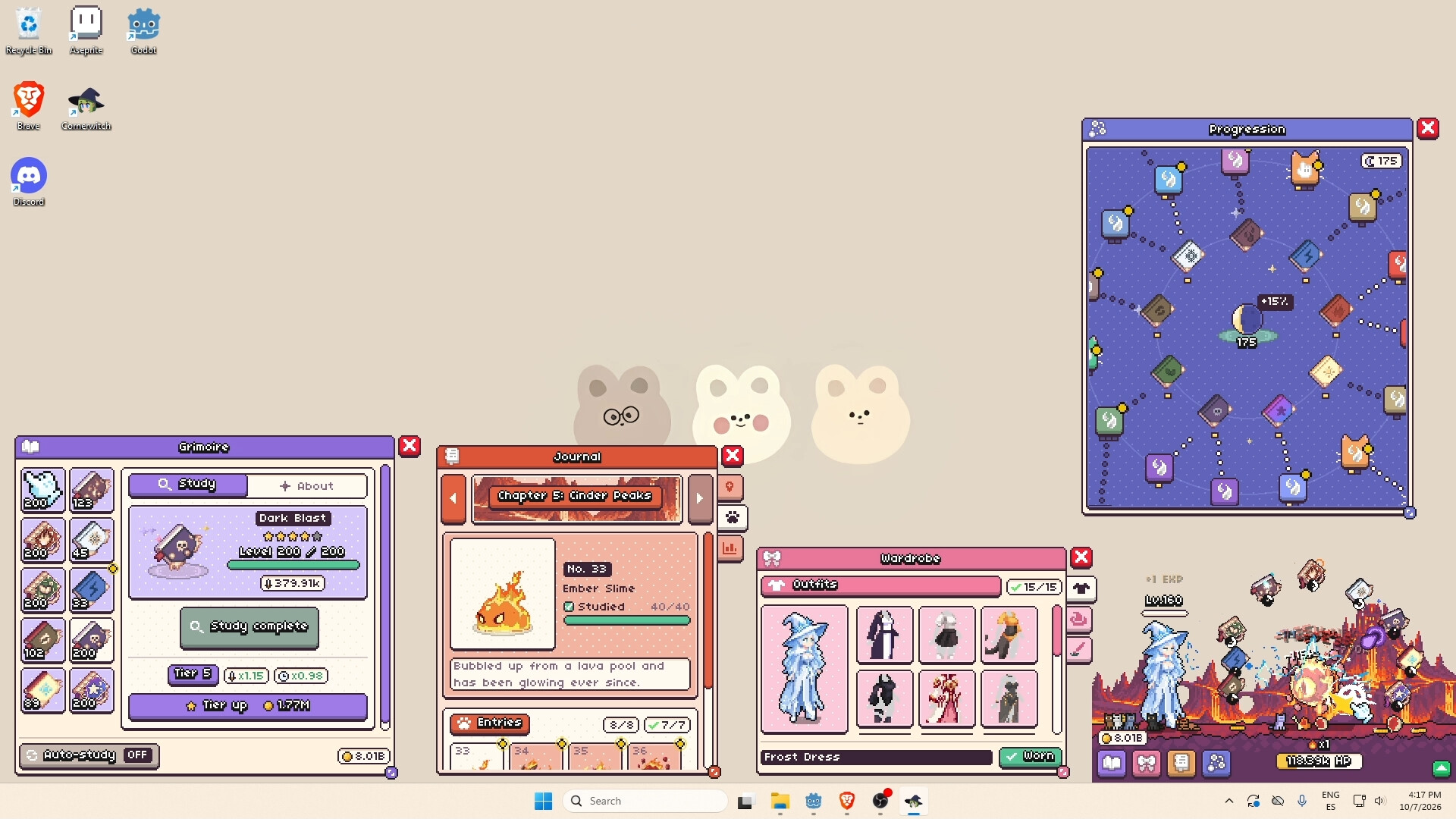
Cornerwitch plays like a miniature adventure clipped to your desktop. You defeat monsters with clicks, collect gold, level the little witch, unlock cosmetics and combat helpers (spells and cats), push bosses, finish studies, and chase rare creatures—while a tiny idle mode keeps soft progress when you look away. This page is the systems overview; pair it with Getting Started for install day and Idle Mode for AFK habits.
Developer AramiGames ships a mouse-friendly, touch-friendly, single-player experience on Steam with save-anytime comfort. Nothing here invents damage formulas or drop rates. After the demo community update, pacing and formulas were improved and spells/skills became easier to read—trust the in-game tooltips more than rumor spreadsheets.
Core loop in one glance
- Position the companion window in a screen corner (snapping can be disabled after the day-one patch).
- Click monsters to deal damage and earn gold.
- Spend progression into levels and unlocks that matter to you.
- Equip or activate helpers—spells and cats—that change how hard you must click.
- Complete studies and watch for rare creature opportunities as longer goals.
- Challenge bosses when ready for achievement milestones.
- Idle when work or rest needs your eyes elsewhere.
That cycle repeats at larger scales: better helpers, tougher foes, prettier cosmetics, clearer UI cues. Browse Spells and Cats, Cosmetics, and Bosses as each pillar opens.
Click combat and gold
Combat is point-and-click by design. Tags emphasize Mouse Only and Touch-Friendly options, so you can play with a classic mouse or a touch surface without learning a hotbar opera. Gold is the visible economy glue: monster defeats feed gold, gold fuels the sense of incremental growth, and leveling converts time into new toys.
Play tips that stay true without datamining:
- Watch feedback, not myths. If a click feels weak, check whether a spell, cat, or level opportunity is waiting—UI cue polish was called out in day-one notes.
- Short bursts beat marathon panic. The genre pitch is cozy and relaxing; stop when your wrist or focus complains.
- Let idle cover the boring minutes. Active clicking teaches; idle maintains. See Idle Mode.
- Keep the window honest. Community reports note resize can freeze until restart—set a size, then leave it alone during deep sessions. Multi-monitor placement improved in the Day One Patch.
Leveling and unlock cadence
Leveling is the gate that reveals cosmetics for the witch, spells, cats, and harder encounters. Because we do not invent unlock trees, use this decision checklist whenever a level-up or shop-like choice appears:
| Question | If yes… |
|---|---|
| Does this unlock make the UI clearer? | Take it—clarity compounds. |
| Does this helper reduce mandatory clicking? | Strong early pick for desk play. |
| Does this cosmetic make you smile? | Valid—session length is a real stat. |
| Does this only help a boss you cannot reach yet? | Park it; build income first. |
| Are you guessing based on a random tier graphic? | Compare with Tier List ideas, then verify in your save. |
Demo feedback explicitly improved gameplay pacing and formulas. If an older guide online disagrees with what you see after launch, prefer your build and this wiki’s frameworks.
Spells, cats, and synergy thinking
Helpers are why Cornerwitch feels like more than a clicker. Spells and cats assist combat so the witch is never alone in the corner. Without publishing spoiler names, evaluate each unlock by:
- Immediate clarity — Can you tell what it does from the UI?
- Idle compatibility — Does it still matter when you are not mashing?
- Boss relevance — Will it help against achievement bosses listed on Steam?
- Opportunity cost — What else could this progression slot have bought?
Deep dive: Spells and Cats. Ranking sandboxes: Spell Tier Ideas, Cat Tier Ideas, Builds.
Studies and rare creatures
Steam and store copy highlight complete studies and find rare creatures as pillars beside bosses and cosmetics. Treat studies as structured goals that reward attention across sessions, and rares as excitement spikes inside an otherwise gentle idle curve. Practical approach:
- Check study progress when you sit down, not every thirty seconds.
- Use active play when a rare cue appears; otherwise keep idle mode respectful of your focus.
- Do not stall forever on one rare if a boss achievement or cosmetic goal would feel better tonight—Cornerwitch is about cozy agency.
Boss pacing
Named bosses tied to Steam achievements include Great Boar, Frost Golem, Fairy Queen, Necromancer, and Magma Demon. Achievement language uses Defeated: [boss] style entries among 22 total achievements, sitting beside story-flavored titles such as First Spark, Apprentice, Journeywitch, Archmage, and Moon-Crowned.
How to play bosses well:
- Arrive with stable gold income and at least one understood helper.
- Clear a normal monster stretch so muscle memory is warm.
- Attempt the boss; if it collapses your calm, retreat to farming and cosmetics.
- Read Bosses for encounter-by-encounter prep ideas.
- Celebrate the Steam popup—then return the window to its quiet corner.
Session templates
Fifteen-minute coffee break
Active clicks → claim an obvious unlock → optional cosmetic peek → idle on.
One-hour evening
Active warm-up → study check → helper experiment → one boss attempt → cosmetics → idle overnight.
Workday companion
Idle Mode primary → short click bursts between tasks → no resize fiddling → see Desktop Companion Tips.
Platform and quality-of-life rules
- Windows is the supported OS line on the store requirements.
- Steam Cloud and Family Sharing reduce friction across machines and households.
- Save Anytime means you can close without a ritual—still finish a click streak if a boss is mid-fight and you care about the attempt.
- Day-one patch improved Linux & Proton compatibility for experimenters, localized some untranslated texts, added disable-snapping, raised maximum game size, fixed multi-monitor placement, and improved visual cues on some UI elements. Track changes on the Updates Hub.
What “good play” looks like
You are playing well when:
- The corner window never steals focus you did not offer.
- Gold and levels feel earned, not grindy.
- Helpers are chosen with a reason you can explain in one sentence.
- Bosses are events, not chores.
- Cosmetics reflect your taste.
- Idle mode covers the gaps without guilt.
You are playing poorly (for this genre) when you chase unverified DPS sheets, ignore wrist comfort, or refuse idle because “real games never AFK.” Cornerwitch is proudly an idler and desktop companion—lean into that.
Next pages
- New to the store page? Getting Started
- Going AFK-heavy? Idle Mode
- Helper decisions? Spells and Cats
- Achievement bosses? Bosses
- Looks first? Cosmetics
- Meta brainstorming? Tier List Hub
- Hardware sanity? System Requirements
Return to the Guides Hub whenever you need the full map. Click kindly, level patiently, and let the witch keep your corner warm.
Frequently Asked Questions
Quick answers for new and returning witches.
What is the basic Cornerwitch gameplay loop?
Click to defeat monsters and earn gold, level up, unlock cosmetics plus spells and cats, pursue studies and rare creatures, fight bosses when ready, and use tiny idle mode when you need to look away.
Do I need a controller or complex keybinds?
No. Steam lists mouse-only and touch-only options. Cornerwitch is built as a point-and-click desktop companion rather than a hotkey-heavy action RPG.
When should I fight bosses while learning the game?
After gold income and at least one helper make sense to you. Use the Bosses guide for Great Boar, Frost Golem, Fairy Queen, Necromancer, and Magma Demon pacing.
Are there official damage numbers in this guide?
No. We avoid invented formulas. Trust in-game UI—improved after demo feedback and day-one cue polish—and evaluate unlocks with the frameworks linked above.
Is multiplayer available?
Cornerwitch is single-player only. Share tips with friends outside the client, but every save is a personal cozy corner.